Create account
Registering for a CookieHub account is a simple process that only takes a few minutes. With an account, you'll be able to manage your website's cookie compliance and consent in one convenient dashboard. To get started, you'll need to provide your email address and the domain where CookieHub will be used. Once you've completed the registration process, you'll be able to explore the full range of features and settings available in the dashboard. Here's a step-by-step guide to help you through the registration process.
Go to the CookieHub website (www.cookiehub.com) and click the "Start free trial" button in the top right corner of the page.
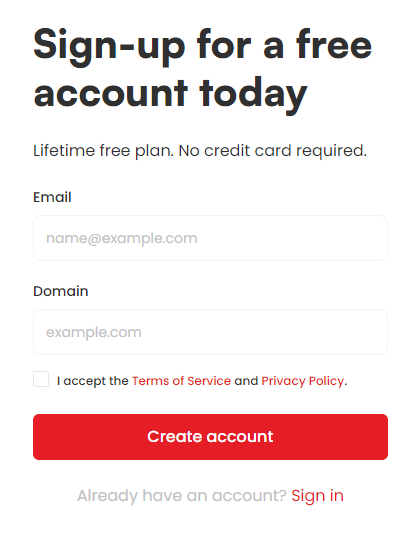
Enter your email address and the domain where you will be using CookieHub. Click the "Create account" button.
Check your email inbox for a verification email from CookieHub. Click the verification link in the email to proceed with the registration process.
Once you've clicked the verification link, you'll be directed back to the CookieHub website. Enter your name and select a password for your account.
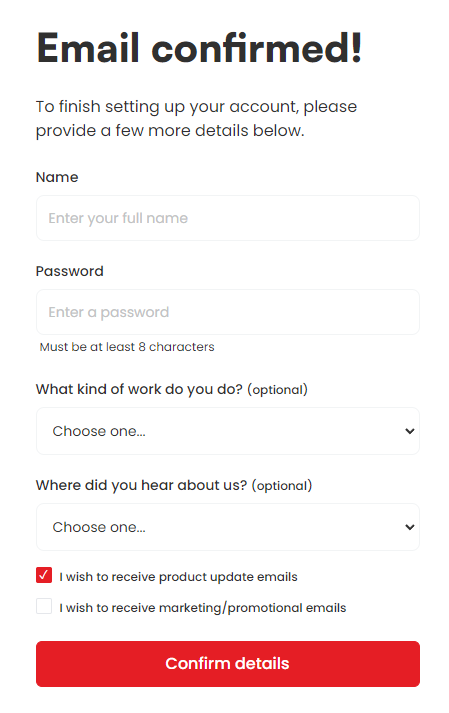
Click the "Confirm details" button to finish the registration process.
You will be directed to the CookieHub dashboard where you can begin setting up your website's cookie consent banner.